
Why the Orange Dot on Your iPhone Screen Is Drawing Increased Attention From Users
A Small Indicator That Carries Important Information
Modern smartphones perform a wide range of tasks, often running multiple applications simultaneously while managing access to sensitive device features. As these capabilities continue to expand, visual indicators have become an important way of helping users understand what their phones are doing in real time.
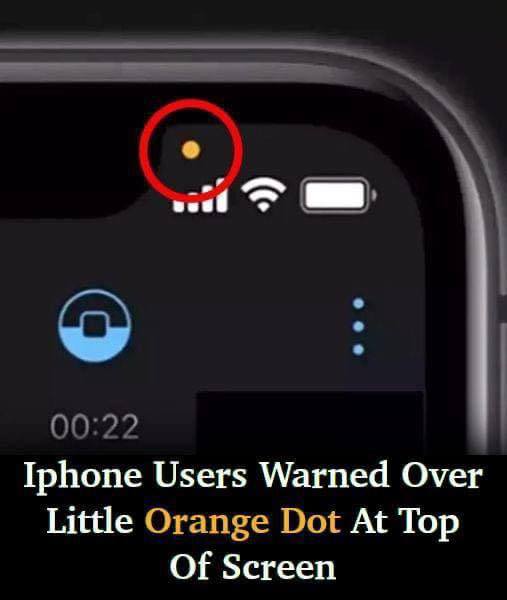
Among the indicators that have captured the attention of iPhone owners is a small orange dot that occasionally appears near the top of the screen. While the symbol may seem insignificant at first glance, it serves a specific purpose that many users consider important for privacy and security.
For some people, spotting the orange dot is reassuring because it confirms that the device is informing them whenever a particular feature is being used. For others, seeing it unexpectedly can raise immediate questions about what is happening in the background.
What the Orange Dot Actually Means
The orange dot is designed to notify users that an application is currently accessing the iPhone’s microphone. Whenever audio is being captured, the indicator appears on the screen to alert the device owner that the microphone is active.
In many situations, the appearance of the dot is entirely expected. Voice calls, video chats, audio recording tools, and other microphone-dependent applications naturally require access to this feature.
When users intentionally open an application that records sound, the orange indicator simply confirms that the microphone is functioning as intended.
This notification system gives people a quick and visible way to understand when audio is being collected through their device.
Why Some Users Are Becoming Concerned
Despite the straightforward purpose of the indicator, concerns have emerged among users who report seeing the orange dot at times when they were not actively using any application that should require microphone access.
Such experiences can be unsettling because the symbol suggests that some software is interacting with the microphone, even if the user is unaware of which application is responsible.
Many individuals have expressed worries about the possibility of their devices listening to them without their knowledge. The unexpected appearance of the orange dot has therefore become a source of anxiety for some users.
Those who noticed the indicator without immediately understanding why often described their reaction as being “quite alarmed.”
In numerous cases, the explanation turned out to be relatively simple. Users frequently discovered that an application remained open in the background or had been forgotten after previous use.
Understanding Background Activity
One reason the orange dot may appear unexpectedly is that applications can continue operating after they are no longer visible on the screen.
Background processes allow apps to perform certain functions even when users switch to other tasks. As a result, an application that previously received microphone permission may still be active.
This can create confusion when the indicator appears during activities that seem unrelated to audio recording.
Because multiple applications can remain open at the same time, identifying the source of microphone activity is not always immediately obvious.
For users who are uncertain about which application is triggering the notification, the situation can appear more concerning than it actually is.

Steps Users Commonly Take When the Dot Appears
When the source of the orange dot is unclear, a practical approach involves closing applications one by one and observing whether the indicator disappears.
This process can help identify which app is currently using the microphone. Once the responsible application is closed, the orange dot should no longer remain visible.
If closing open apps does not resolve the issue, some users choose to turn off their devices completely.
Restarting the phone can stop active processes and provide an opportunity to determine whether the indicator returns after the device powers back on.
Should the orange dot continue to appear after a restart despite no obvious microphone-related activity, users may become more concerned about what is causing the behavior.
Privacy Features Designed to Increase Transparency
Although the appearance of the orange dot can sometimes cause concern, its existence reflects a broader effort to improve transparency regarding device activity.
Without a visible notification, users would have little way of knowing when an application was accessing sensitive hardware such as a microphone or camera.
The indicator therefore functions as an additional layer of awareness rather than a warning that something is automatically wrong.
By displaying a clear visual signal, the phone allows users to monitor access to important features in real time.
This can help people make more informed decisions about the applications installed on their devices and the permissions they choose to grant.
The Difference Between the Orange and Green Dots
The orange dot is not the only indicator that may appear at the top of an iPhone screen.
A green dot serves a related but distinct purpose. Instead of signaling microphone use, the green indicator shows that an application is currently accessing the device’s camera.
The two notifications work together to provide immediate information about how applications are interacting with hardware components that many users consider sensitive.
Understanding the distinction between the colors can help eliminate confusion when either indicator appears unexpectedly.
While the orange dot points to microphone activity, the green dot specifically relates to camera usage.
How the Indicators Work During Camera Use
Using the phone’s camera offers a practical example of how these indicators may appear during everyday activities.
When the camera application is launched, a green dot typically becomes visible because the camera is actively being used.
In some situations, the indicator may briefly switch to orange before disappearing after the application is closed.
This behavior reflects the fact that both the camera and microphone can be engaged during certain camera-related functions.
The notifications provide a real-time acknowledgment that these hardware components are active while the application is operating.
Once the application is exited and access to those features ends, the indicators disappear from the screen.

Remaining Aware of Active Applications
Even when the indicators are functioning exactly as intended, users are encouraged to remain aware of the applications running on their devices.
Many apps request access to microphones and cameras as part of their normal operation. Over time, it can become easy to forget which permissions have been granted.
The appearance of an orange or green dot can therefore act as a reminder that a particular application is currently using one of those features.
Paying attention to these notifications can help users better understand the relationship between app activity and device permissions.
Awareness of background processes can also reduce confusion when indicators appear unexpectedly.
Reviewing Permission Settings
Users who remain concerned about microphone or camera access have the option to review the permissions assigned to their applications.
Within the device settings, permissions can be adjusted to limit or remove access to these features for specific apps.
Managing these settings allows users to exercise greater control over how applications interact with their devices.
For individuals who become uneasy after noticing the orange dot, checking permission configurations can provide additional reassurance.
Regularly reviewing access settings can also help ensure that only trusted applications retain permission to use sensitive hardware features.
Why the Indicator Matters
The orange dot may be small, but it represents an important privacy feature designed to keep users informed.
Its appearance signals that an application is using the microphone, while the green dot indicates camera access.
Although unexpected notifications can occasionally cause concern, these indicators ultimately provide visibility into activities that would otherwise occur unnoticed.
Rather than leaving users unaware of microphone or camera usage, the system offers immediate feedback whenever those features are engaged.
For many iPhone owners, that added transparency remains a valuable tool for understanding and managing the behavior of applications running on their devices.